Custom Actions in Arc: Build Your Own AI Tools
Stop context-switching. Create custom AI actions in Arc that work on any screen — from replying to summarizing. Free to try.
The Hidden Cost of Context-Switching
Every professional knows the friction of modern digital work. You read an email, switch to a browser tab to research a concept, copy the relevant text, switch to an AI tool to simplify it, copy the result, and finally switch back to your email client to paste.
This cycle—what we call the context-switching tax—drains your focus and consumes valuable time. Every time you leave your active workspace, you break your flow state. I built Custom Actions because I was tired of this cycle — and the data proves I’m not alone. Arc’s 28,000+ users now execute over 5,900 custom actions per month, a clear signal that people would rather act on content without ever leaving the app they’re in.
Introducing Custom Actions in Arc
With the release of Custom Actions in Arc: AI Screen Assistant, we are fundamentally changing how you interact with your device. Instead of leaving your current app to find answers, you can now build personalized AI workflows that live in your floating sidebar.
These actions act directly on the screen content you are looking at. With a single tap, Arc processes your current view, executes a specific command, and presents the result—without you ever needing to navigate away.
Three Ways to Transform Your Workflow
Custom Actions are as versatile as your daily tasks. Here are three ways our users are already reclaiming their time:
1. The ‘Draft Reply’ Action
Don’t stare at a blank cursor. Create a Custom Action that pulls context from your current email thread or messaging app and drafts a thoughtful, professional response in your brand voice.
2. The ‘Simplify Technical Jargon’ Action
Reading dense documentation or complex error logs? Highlight the text and trigger your custom ‘Simplify’ action. Arc will distill the complexity into plain language, allowing you to move forward without getting stuck in the weeds.
3. The ‘Extract Action Items’ Action
Turn chaotic meetings or long threads into a structured list. This action scans the screen content to automatically pull out deadlines, follow-up items, and owner assignments, saving you from manual note-taking.
Building Your Perfect Workflow
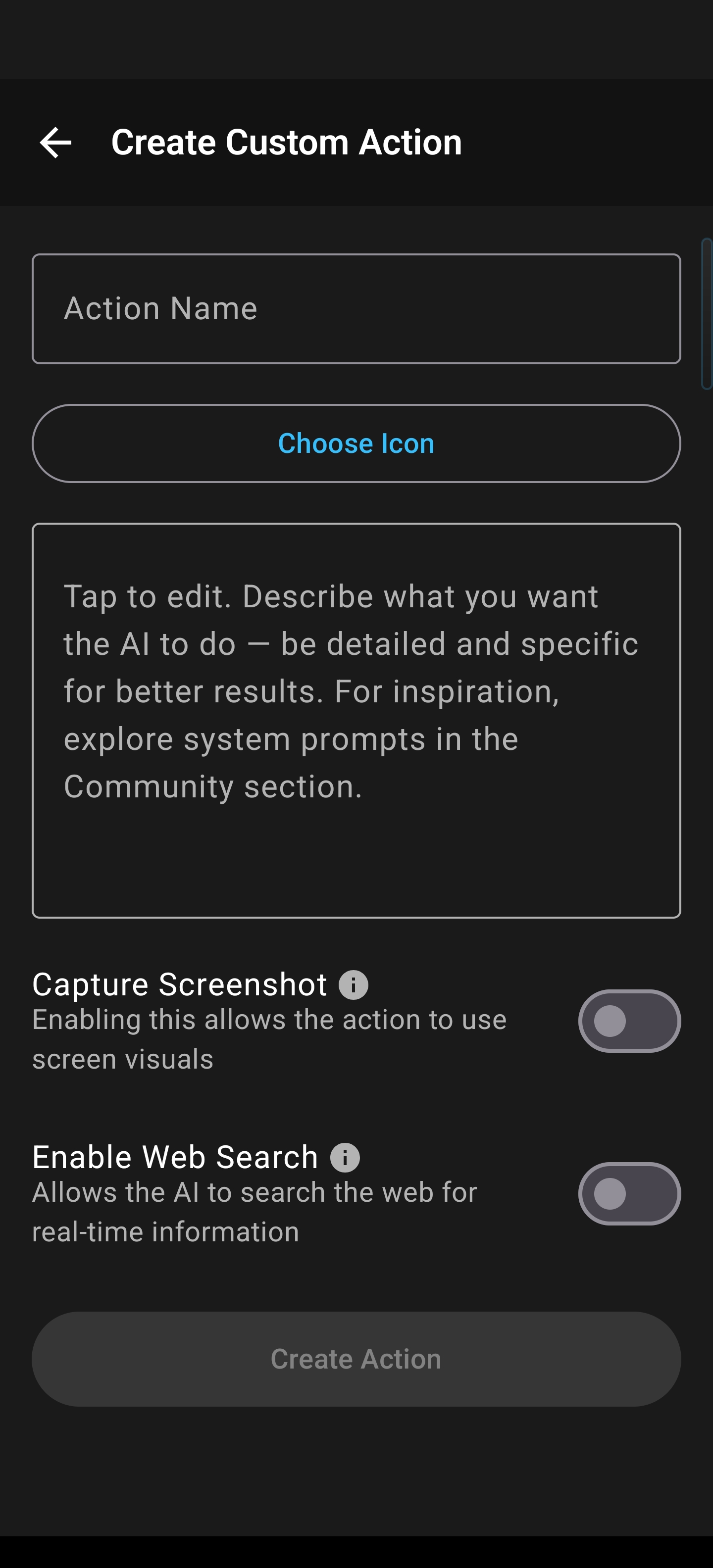
Getting started is simple. Within the Arc interface, you can define the specific prompt or workflow that you use most frequently.
The create form, shown here, allows you to name your action, set your instructions, and configure how the AI should handle your screen context. Once saved, these actions appear directly in your sidebar, ready for instant execution whenever you need them.
Reclaim Your Focus Today
Custom Actions are not just about shortcuts; they are about purpose-driven automation. By reducing the distance between your intention and the action, Arc: AI Screen Assistant helps you stay in the flow and produce your best work. Over 5,900 custom actions run every month across Arc’s 8,500+ monthly active users — that’s thousands of moments where someone skipped the context switch and got straight to the result. With India (47% of users) and the US (13%) leading adoption, Custom Actions have become one of Arc’s most-used features worldwide.
Ready to build your own workflow?