Doomscrolling Fix: AI Screen Assistant for Android
Your doomscrolling fix isn't another screen time limiter. Arc's AI screen assistant summarizes content and breaks the scroll cycle. Free to try.
You open your phone to check one message. Forty-five minutes later, you’re deep in a thread about cryptocurrency scandals you didn’t care about five minutes ago. Sound familiar?
The average person spends 4.6 hours daily on their phone — nearly 70 full days a year. Over a lifetime, that adds up to roughly 12 years staring at a screen. And a significant chunk of that time isn’t productive. It’s doomscrolling: the compulsive, mindless consumption of negative or low-value content that leaves you drained, not informed.
Over 28,000 Android users have installed Arc to break this exact cycle. By letting AI extract what matters from any screen in one tap, they’re replacing endless scrolling with instant answers — and spending less time on their phones as a result.
The real problem? Your phone is designed to keep you scrolling. Every app optimizes for engagement, not utility. But what if your phone could do the opposite — extract what you actually need in one tap and let you close the app?
That’s the Android doomscrolling fix most people haven’t tried. And it doesn’t involve willpower, grayscale screens, or another screen time app you’ll ignore in a week.
Why Most Android Doomscrolling Fixes Don’t Work
Let’s be honest about the tools Android already gives you:
- Digital Wellbeing timers — You set a 30-minute limit on Instagram. You hit it. You tap “Extend” and keep scrolling. Everyone does.
- Grayscale mode — Makes your screen boring. Also makes maps, photos, and legitimate work harder to use. You turn it off.
- App pausing — Pauses notifications but doesn’t address the habit of opening the app in the first place.
- Focus mode — Useful for work hours, but it’s a binary on/off switch. Life isn’t that clean.
These tools fail for the same reason: they fight the symptom, not the cause. They try to block access or make scrolling less pleasant. But the root cause of doomscrolling isn’t access — it’s friction. Or rather, the lack of it.
You scroll because extracting value from content takes effort. Reading a long article to find the key point? Effort. Scanning an email thread for the meeting link? Effort. Finding the actionable bits in a dense news page? Effort. Scrolling past it all is easier than engaging with it.
The fix isn’t more blockers. It’s less friction.
The Real Android Doomscrolling Fix: Extract, Don’t Scroll
Here’s the shift that changes everything: instead of reading everything on a page to find what you need, what if an AI screen assistant pulled out the important stuff for you — instantly?
That’s the core idea behind Arc’s approach. Arc is an AI screen assistant that sits as a floating sidebar over any app on your Android device. It reads what’s on your screen and gives you what you actually need, without making you switch apps or scroll through walls of text.
When you encounter a long article, a dense email, or a page full of information, you don’t need to read it all. You tap once, and Arc’s AI extracts the summary, the key action items, the meeting links, the contact details — whatever matters. Then you’re done. You close the app and move on with your day.
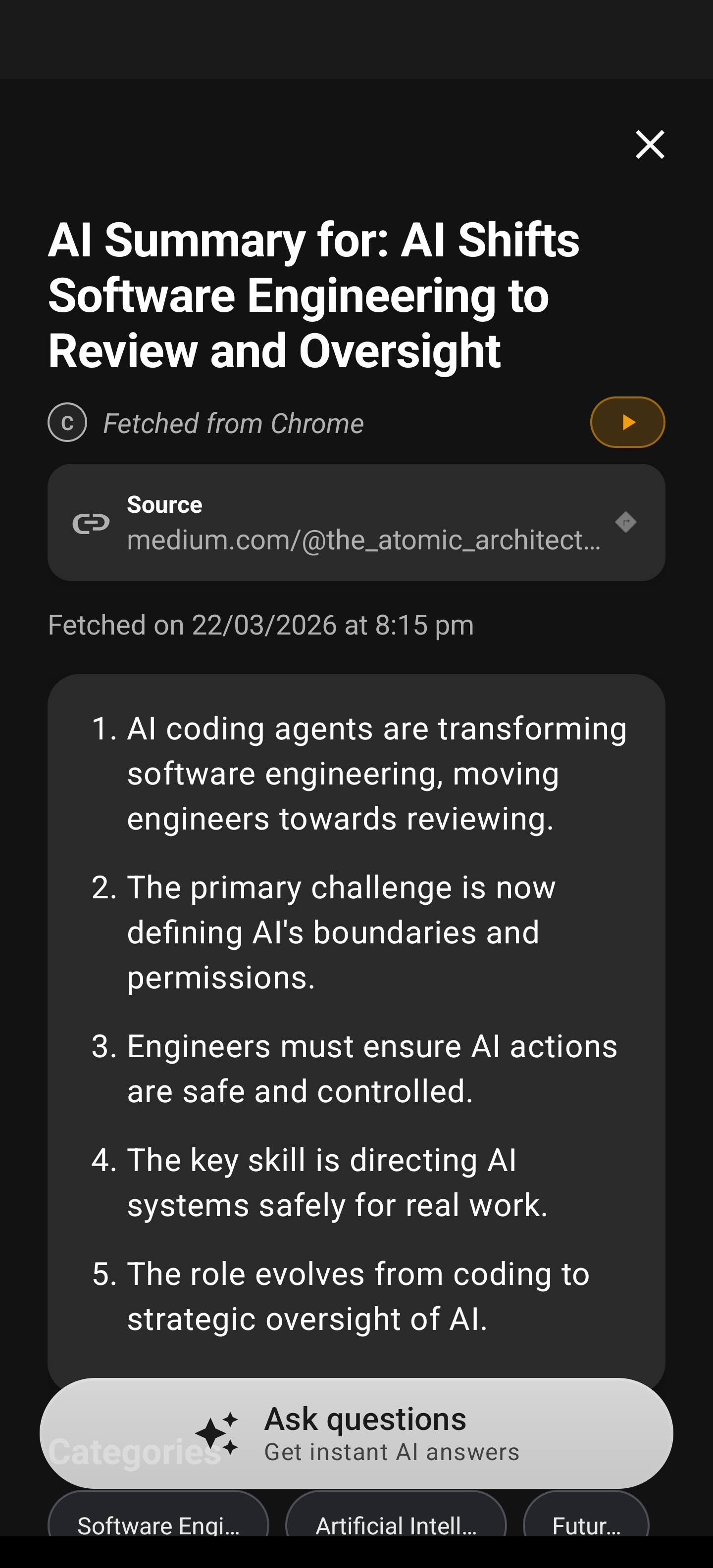
This isn’t about blocking content. It’s about making content so easy to process that you don’t need to scroll. The faster you get what you need, the faster you put your phone down.
How Arc Smart Extract Kills the Scroll Reflex
The standout feature for breaking the doomscroll loop is Arc Smart Extract. Here’s how it works:
- You’re on any screen — an email, a news article, a WhatsApp message, a webpage in Chrome. Arc’s floating sidebar is a swipe away.
- Tap Smart Extract — Arc’s AI analyzes everything visible on your screen.
- It identifies actionable items — events, reminders, contacts, meeting links, locations, verification codes, phone numbers, and email addresses.
- One-tap actions — Add an event to your calendar. Save a contact. Copy a verification code. Open a map. Join a meeting. All from the same screen, without switching apps.
Instead of reading a long email to find the Zoom link buried in paragraph four, Smart Extract surfaces it immediately. Instead of scrolling through a webpage to find the phone number for a restaurant, it’s right there. The information you need comes to you — you don’t go hunting for it.
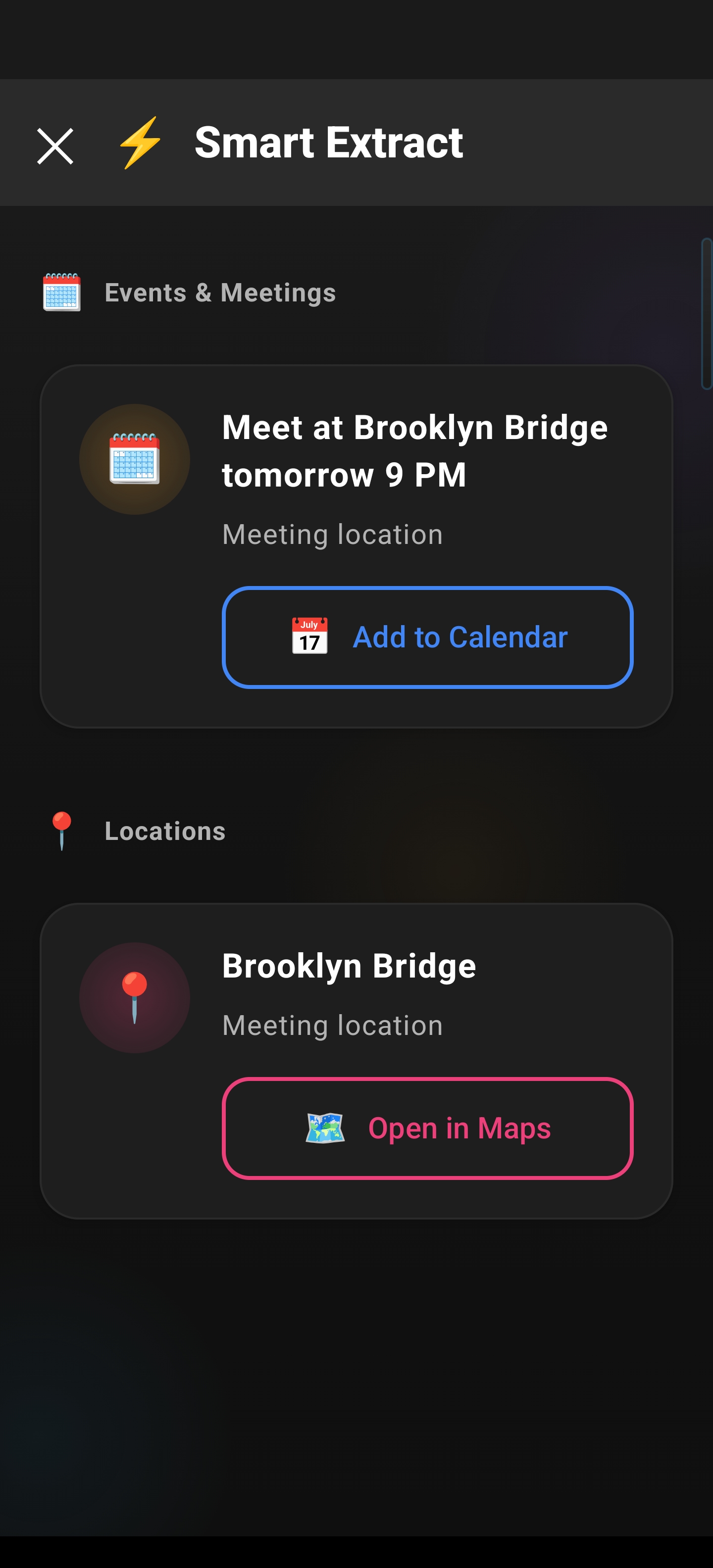
This fundamentally changes how you interact with your phone. You stop scrolling because scrolling becomes unnecessary. The value is already extracted.
Beyond Smart Extract: More Ways Arc Fights Phone Addiction on Android
Smart Extract is the sharpest tool, but Arc’s full feature set targets the same root problem: reducing the time between “I need something” and “I have it.”
Instant AI Summaries
Long article? Don’t read it. Tap once, and Arc delivers a concise AI summary without leaving your current app. You get the key points in seconds, not minutes. That’s a 2,000-word article reduced to three bullet points you can scan in 15 seconds. Across 28,000+ installs, users generate over 3,000 AI summaries every month — it’s the single most popular way to cut through content without getting pulled into the scroll.
AI Chat About Screen Content
Read a summary and still have questions? Chat with Arc’s AI about what’s on your screen. Ask for clarification, request fact-checking, or dive deeper on a specific point — all without switching to a separate AI app. The context is already there.
Save for Later
Not everything needs your attention right now. One tap saves content from any app to your Arc library. Come back to it when you’re at your desk, not when you’re supposed to be present with your family. Removing the urgency removes the scroll.
AI Writer for Quick Replies
The doomscroll cycle often includes messaging — you see a message, and instead of replying, you fall into the feed. Arc’s AI Writer drafts contextual replies to emails, messages, and social posts directly from the sidebar. Reply in seconds, close the app, done.
Phone Addiction on Android Is a Friction Problem — And an AI Screen Assistant Solves It
Here’s the uncomfortable truth about phone addiction on Android: your brain isn’t broken. Your phone is just too good at keeping you engaged without giving you what you actually need.
Think about what happens when you doomscroll:
- You open an app for a specific reason (check a message, find a link, read one article)
- The app surfaces more content designed to keep you there
- Extracting value from that content requires effort (reading, scanning, searching)
- Scrolling past is easier than engaging, so you keep scrolling
- You emerge 30 minutes later with nothing useful and a mild headache
An AI screen assistant like Arc inverts this dynamic:
- You open an app for a specific reason
- Arc extracts exactly what you need in one tap
- You act on it immediately (save, reply, add to calendar)
- You close the app because there’s nothing left to scroll for
The phone addiction loop on Android isn’t broken by limiting screen time. It’s broken by making screen time so efficient that you naturally spend less of it.
How to Set Up Arc as Your Android Doomscrolling Fix
Getting started takes under two minutes:
- Download Arc from the Google Play Store
- Grant accessibility permissions — Arc uses Android’s accessibility service to read screen content. It doesn’t collect your data. Nearly 400 sensitive apps (banking, health, payment) are blocked by default.
- Customize your sidebar — Choose which apps Arc appears in, adjust sidebar size, and set edge-trigger preferences.
Open Settings in Arc to choose exactly which apps the sidebar appears in. If you only want AI assistance in your browser and email client, you can restrict it to just those. The sidebar is configurable — it stays out of your way until you need it.
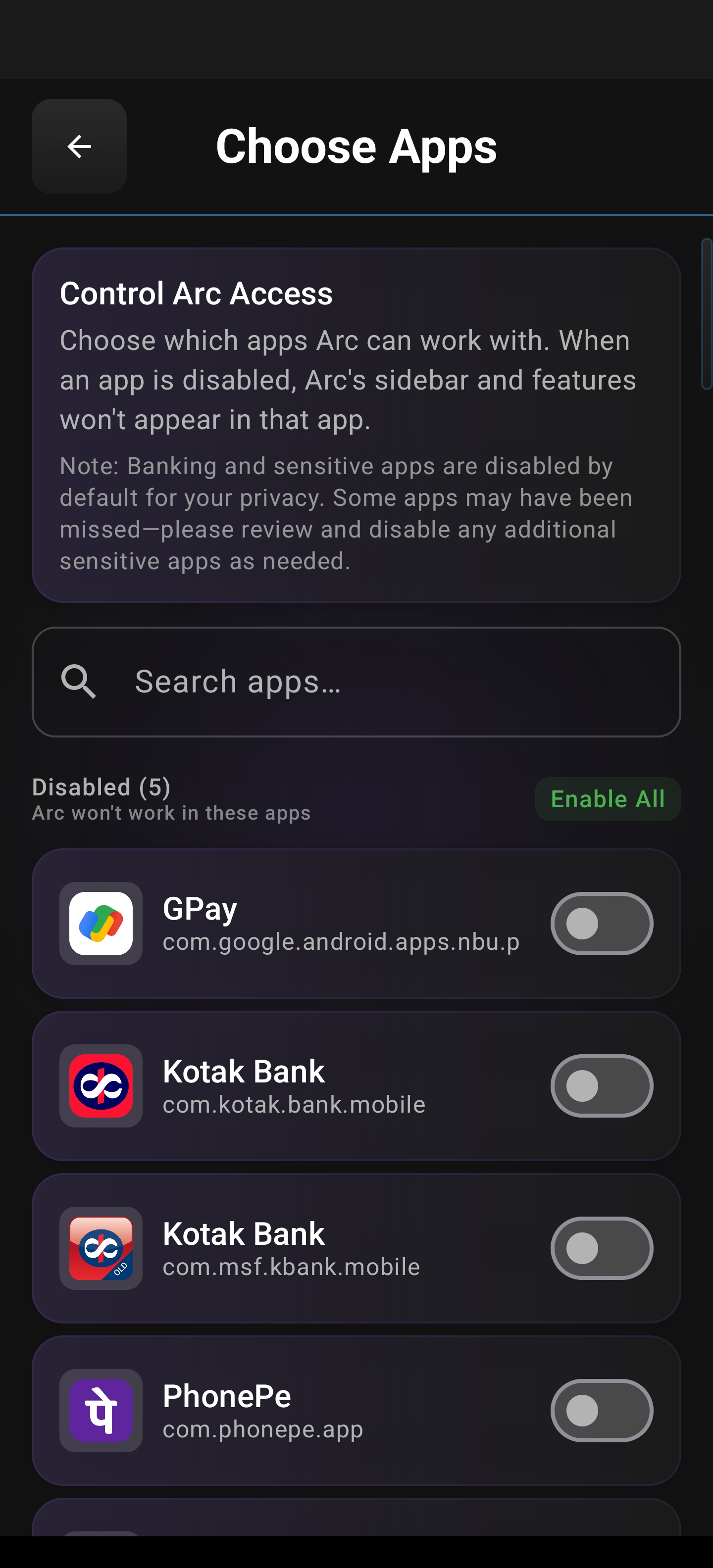
- Swipe and tap — From any supported app, swipe the edge of your screen to reveal the floating sidebar. Tap Smart Extract, AI Summary, or any feature. Get what you need. Close the app.
That’s it. No complex setup, no behavioral contracts, no guilt-tripping notifications about your screen time.
The Numbers Behind the Problem
If you’re still wondering whether doomscrolling is a real problem worth solving with a real tool:
- 210 million people worldwide are addicted to social media and the internet
- 31% of US adults admit to doomscrolling
- The average person spends the equivalent of 70 full days per year on their phone
- Teens who spend more than 5 hours daily on screens are twice as likely to show symptoms of depression
- Heavy screen users are 40% more likely to struggle with anxiety
- 72% of Gen Z believe their mental health would improve if phone apps were less addictive
These aren’t trivial numbers. And the existing solutions — timers, blockers, grayscale — haven’t moved them. A different approach is worth trying.
Download Arc: Your Android Doomscrolling Fix
Arc isn’t a screen time tracker that guilt-trips you. It’s an AI screen assistant that makes your phone usage so efficient you naturally spend less time on it. Smart Extract pulls out what you need. AI Summaries give you the key points. Save for Later removes the urgency. AI Writer handles your replies. You get in, get what you need, and get out.
Download Arc for free on Android:
No subscriptions. No paywalls. Just a smarter way to use your phone — and a proven way to stop scrolling past your life.
Frequently Asked Questions
What is the best Android doomscrolling fix? The most effective fix reduces the friction between you and the information you need, so you don’t have to scroll to find it. Arc’s AI screen assistant — especially the Smart Extract feature — surfaces actionable items from any app in one tap, eliminating the need to scroll through irrelevant content.
How does Arc Smart Extract work? Smart Extract uses AI-powered analysis to scan whatever is currently on your screen. It identifies events, reminders, contacts, meeting links, locations, verification codes, phone numbers, and email addresses — then provides one-tap actions for each. You can add events to your calendar, save contacts, copy codes, and join meetings without switching apps.
Is Arc free to try? Yes. Arc offers a free tier with core features like AI Summary and Smart Extract. An optional premium subscription unlocks unlimited usage, Read Aloud, AI Writer, and more. Sign in with Google for cloud backup and community features.
Does Arc collect my personal data? No. Content is stored locally on your device, and nearly 400 sensitive apps (banking, health, payments) are blocked by default. Arc uses Android’s accessibility service to read screen content — it doesn’t send your personal data to servers.
How is Arc different from screen time apps? Screen time apps try to limit access or make your phone less engaging. Arc takes the opposite approach: it makes your phone usage so efficient that you naturally spend less time on it. Instead of blocking content, it extracts what you need instantly.
Which Android apps does Arc work with? Arc works across all your Android apps — browsers, email clients, messaging apps, social media, PDF viewers, and more. You can customize exactly which apps the floating sidebar appears in through Arc’s settings.