AI Reply on Android: Draft Replies in Any App
Generate context-aware replies in any app with Arc's AI Reply. No copy-pasting — just swipe and send. Free to try.
You’re mid-conversation on WhatsApp, a work email just landed, and your group chat won’t stop buzzing. Typing thoughtful replies takes time — and you’re already three messages behind. AI-powered app replies can change that completely. Instead of staring at a blank text field, you get instant, context-aware draft replies that match the tone and content of whatever’s on your screen.
This isn’t about sending robotic canned responses. It’s about having an AI text reply generator that reads the conversation you’re in, understands what’s being discussed, and crafts a reply that actually fits — then drops it right into the input field so you can send it in one tap.
I built Arc’s AI Writer Reply mode for exactly this workflow, and the usage data speaks for itself: over 2,700 reply drafts generated every month by users who’ve stopped dreading their inboxes. If you’ve ever wanted to reply to messages faster on Android without sacrificing quality or personality, here’s how it works and why it matters.
What Is an AI Reply Assistant on Your Phone?
An AI reply assistant on your phone is a tool that generates draft replies based on the context of whatever you’re currently viewing. Unlike generic auto-reply features or template-based responders, a true AI reply tool:
- Reads your screen — It sees the conversation, email, or message thread you have open
- Understands context — It picks up on tone, questions, and key details from the text
- Generates relevant drafts — It writes a reply that matches the conversation, not a one-size-fits-all response
- Places the text where you need it — The draft goes straight into the input field, ready for a quick edit or instant send
The key difference? You stay in your app. No copy-paste gymnastics, no switching between a chat window and a separate AI app. The assistant comes to you.
Why Android Users Need an AI Reply Tool
Android messaging is fragmented by design. You might use WhatsApp for friends, Slack for work, Google Messages for SMS, Telegram for communities, and Gmail for longer-form communication. Each has its own conventions, its own pace, and its own expectations.
The Problem with Manual Replies
- Time drain — Composing thoughtful replies across multiple apps eats into your day
- Context switching — Jumping between conversations and a notes app just to draft a response is inefficient
- Reply fatigue — By the end of the day, every message feels like a chore, leading to short, vague, or delayed replies
- Inconsistency — When you’re tired, your tone shifts. Professional messages become too casual; personal messages become too curt
An AI reply assistant on your phone solves each of these problems by doing the heavy lifting in the background. You review, optionally tweak, and send — often in under five seconds.
How Arc’s AI Writer Reply Mode Works
Arc is a system-wide Android AI assistant that lives in a floating sidebar on top of any app. Its AI Writer feature includes a dedicated Reply mode designed specifically for drafting responses to conversations.
Here’s how it works in practice:
- Open any conversation — WhatsApp, Telegram, Slack, SMS, email, or any messaging app
- Swipe to open Arc’s sidebar — The floating bar on your screen edge expands with one swipe
- Tap AI Writer → Reply — Arc reads the conversation on your screen and generates a contextually relevant reply
- Review and customize — Adjust the tone (casual, professional, friendly) and length before sending
- Insert and send — The draft drops directly into the text field
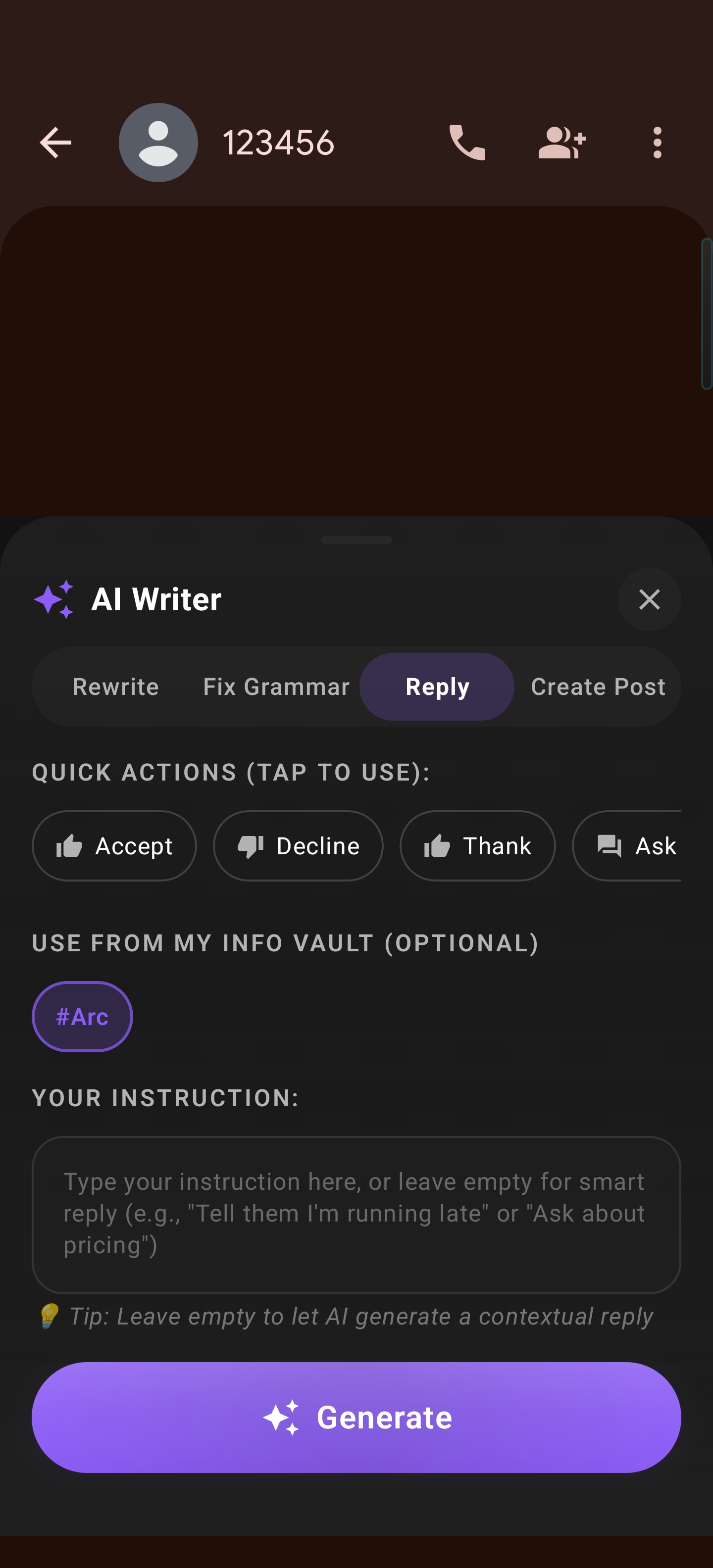
The entire process takes less time than typing a single sentence manually.
The Real Advantages of AI Reply on Android
Speed Without Sacrificing Quality
The biggest misconception about AI-generated replies is that they feel artificial. In reality, a good AI text reply generator produces drafts that sound like you — because they’re based on the conversation you’re actually having. Arc’s Reply mode reads the full context on your screen: who’s talking, what they said, what’s been discussed, and what tone the conversation carries.
You reply to messages faster on Android because the AI handles composition. But the quality stays high because you’re always the final editor before anything goes out.
Works Across Every Messaging App
Arc isn’t tied to a single platform. Because it uses Android’s accessibility service to read what’s on your screen, it works in:
- WhatsApp and Telegram — Personal and group chats
- Slack and Microsoft Teams — Work conversations and channels
- Google Messages and SMS — Traditional text messaging
- Gmail and Outlook — Email threads that need thoughtful responses
- Instagram, Facebook Messenger, X — Social DMs and replies
- Any app with a text input field — Even niche or regional messaging apps
That’s the power of a system-wide AI reply assistant on your phone. One tool, every conversation. With 28,000+ Android users across 50+ countries relying on it — and India (47%) and the US (13%) as the biggest markets — Arc’s reply generation works across every app and language context you can imagine.
Tone Control That Matches the Moment
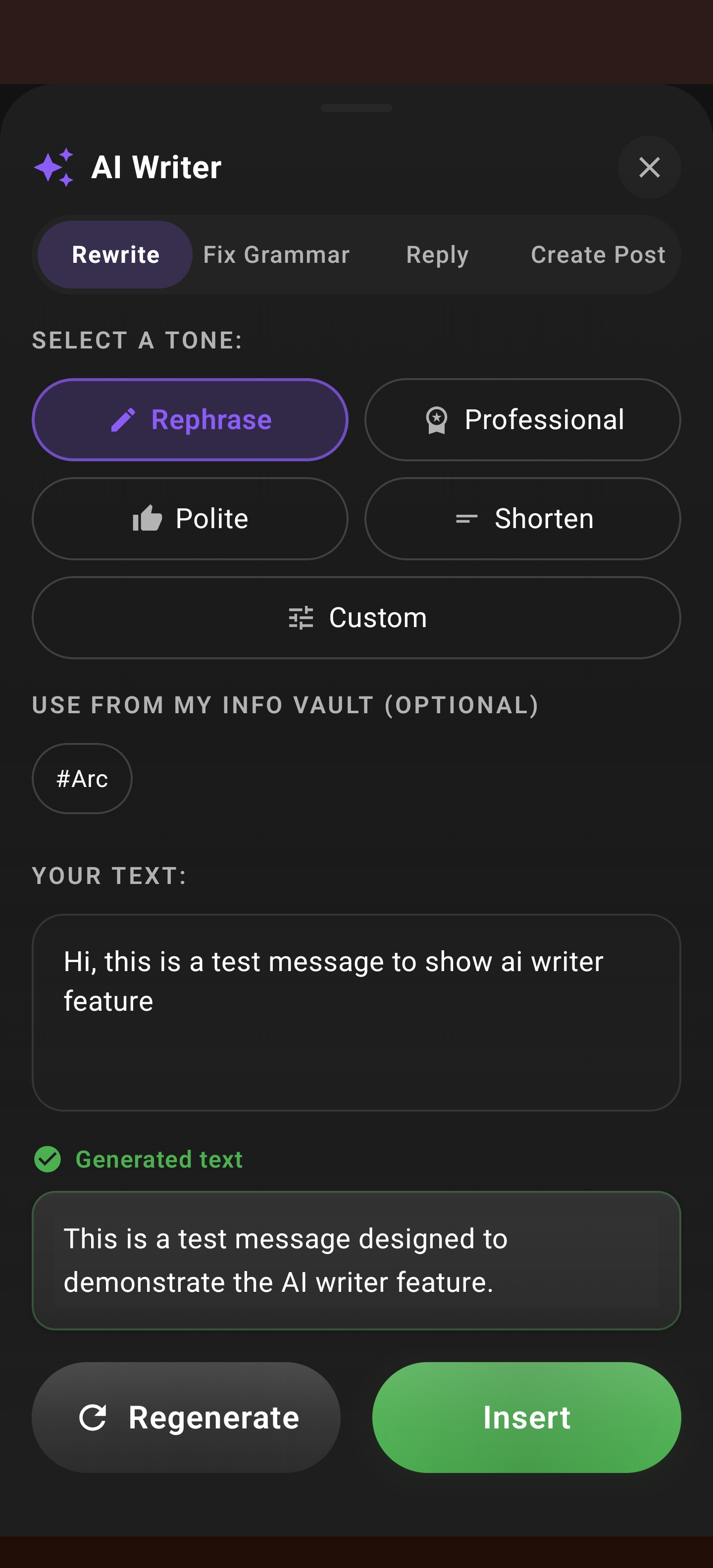
Not every conversation deserves the same voice. Arc’s AI Writer gives you tone and length options so each reply feels appropriate:
- Professional — For work emails, client messages, and formal threads
- Friendly — For colleagues, acquaintances, and semi-casual chats
- Casual — For close friends, family, and relaxed group chats
- Concise or detailed — Choose a brief response or a thorough one depending on what the moment calls for
This tone flexibility means your AI reply on Android doesn’t produce one-size-fits-all output. A Slack thread with your team gets a different style than a WhatsApp message to your partner. The AI adapts because it reads the room — or in this case, the screen.
AI Reply vs. Traditional Auto-Reply: What’s the Difference?
It’s worth being clear about what separates a genuine AI text reply generator from the basic auto-reply features some messaging apps offer:
| Feature | Basic Auto-Reply | Arc AI Writer Reply |
|---|---|---|
| Context awareness | None — sends the same template every time | Full — reads the conversation on screen |
| Personalization | None or minimal | Tone and length customization per reply |
| App compatibility | Usually locked to one app | Works in every app on your phone |
| Grammar and language | Fixed templates, often awkward | AI-generated, natural-sounding drafts |
| Editing before send | Rarely possible | Always — you review before sending |
The distinction matters. A true AI reply assistant on your phone doesn’t just send messages on your behalf. It drafts them intelligently and hands you full control.
Getting Started: Set Up AI Reply on Android in Minutes
Setting up Arc’s AI Writer Reply mode is straightforward:
- Download Arc from the Google Play Store — Get Arc here
- Grant permissions — Arc needs accessibility and overlay permissions to read your screen and display the sidebar. The app walks you through this interactively
- Swipe to open the sidebar — The floating bar appears on your screen edge. Swipe inward to expand it
- Tap AI Writer → Reply — Point it at any conversation and get your draft instantly
- Customize and send — Choose tone, adjust length, edit if needed, and send
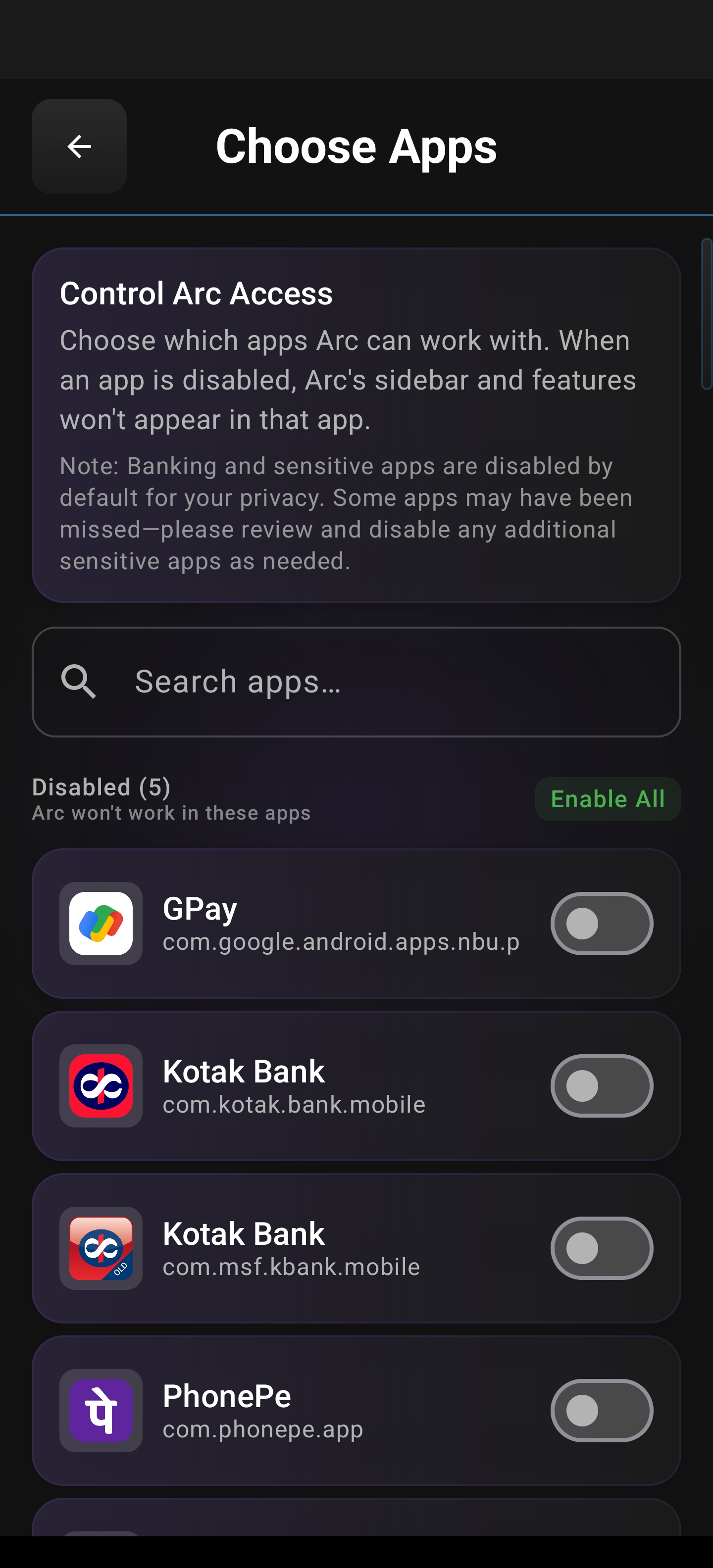
Arc also lets you fine-tune which apps the sidebar appears in. If you don’t want the floating bar in your camera app or a game, just go to Settings → Choose Apps and toggle specific apps on or off.
Beyond Replies: AI Writer’s Other Modes
While Reply mode is the star for messaging, Arc’s AI Writer includes three additional modes that round out the writing toolkit:
Rewrite Mode
Got a draft that doesn’t sound right? Paste it into any text field and use Rewrite to rephrase, restructure, or change the tone. Perfect for polishing Slack messages before sending or refining an email draft.
Fix Grammar Mode
Quickly correct typos, grammar mistakes, and awkward phrasing in anything you’ve typed. Works in any app — not just email, but social media posts, chat messages, and documents.
Create Post Mode
Need to write from scratch? Create Post generates original content based on a topic or prompt. Useful for LinkedIn posts, social captions, forum replies, or any situation where you need fresh content, not a response to an existing thread.
Each mode uses the same context-aware engine. The AI reads your screen and generates output that’s relevant to what you’re working on.
Privacy and Data Security
Any tool that reads your screen raises a fair question: what happens to my data?
Arc processes your screen content to generate replies, but the data is handled with privacy as a core principle:
- Encrypted in transit — When cloud processing is needed, your data is encrypted during transmission
- Never stored on servers — Content is not retained after processing
- Not sold to third parties — Your conversations and data are never monetized
- You stay in control — Every AI-generated draft goes through you before it’s sent
An AI reply assistant on your phone should make you faster, not make you nervous about where your data goes. Arc is built on that principle.
Frequently Asked Questions
Does AI Reply work in every Android messaging app?
Yes. Arc uses Android’s accessibility service to read screen content, so it works in WhatsApp, Telegram, Slack, Google Messages, Gmail, Instagram DMs, Facebook Messenger, and any other app that displays text conversations.
Can I edit the AI-generated reply before sending?
Absolutely. Every draft is placed in your input field for review. Edit, shorten, expand, or completely rewrite before you hit send. The AI handles the first draft — you have the final say.
How is this different from my keyboard’s autocomplete?
Keyboard autocomplete predicts the next word or short phrase. Arc’s AI reply on Android generates a complete, contextually appropriate response based on the entire conversation on your screen. It’s the difference between “Sure” auto-suggested and a full reply that addresses the specific points in the message you received.
Does it require a subscription?
No. Arc’s core features, including AI Writer and Reply mode, work on the free tier. An optional ad-free subscription is available for users who want to remove ads and get priority support, but all AI features are accessible without paying.
What Android version do I need?
Arc supports Android 5.0 (Lollipop) and above, which covers virtually all active Android devices.
Start Using AI Reply on Android Today
Every day, you spend minutes — sometimes hours — composing replies across messaging apps. An AI reply on Android gives those minutes back without sacrificing the quality or personalization of your responses. Arc’s AI Writer Reply mode reads the conversation, drafts a relevant response, and drops it where you need it — all without leaving the app you’re in.
Whether you need a AI text reply generator for professional emails, want to reply to messages faster on Android across every chat app, or simply want an AI reply assistant on your phone that respects your privacy and your time, Arc delivers.
Download Arc from the Google Play Store and start drafting smarter replies today.