Fact-Check Anything on Your Android Screen — Instantly
Fact-check any claim on your screen instantly. Arc reads and verifies statements in real time — news, messages, social media. Free to try on Android.
Every day, your phone feeds you claims. A WhatsApp forward says rice cures acidity. A tweet insists a new policy bans something you use daily. A news headline screams something that doesn’t quite add up. Your first instinct? Open a browser, search, read three articles, and try to figure out what’s actually true. Ten minutes later, you’ve fallen down a rabbit hole and you’re still not sure.
An AI fact checker Android solution changes this entirely. Instead of juggling tabs and spinning through search results, you highlight the claim on your screen and get an instant, source-backed verdict. No app switching. No guessing. I built Arc’s fact-checking capabilities exactly for this — and with 3,000+ AI summaries generated every month by users who rely on instant screen-level analysis, the demand for verification without friction is clear.
This post walks through why your phone needs a dedicated fact-checking tool, how screen-level AI verification works, and the exact steps to start using one today.
Why Android Users Need an AI Fact Checker
Misinformation isn’t a desktop problem. It’s a mobile problem. Over 70% of Indians access the internet solely through their phones. WhatsApp, X (Twitter), Instagram, YouTube Shorts — the platforms where dubious claims spread fastest are the ones you use on your phone.
The problem isn’t just fake news sites. It’s the small stuff:
- A health remedy shared in a family group
- A financial tip from a Telegram channel
- A political claim in a reel’s comment section
- A product review that sounds suspiciously polished
Each one is a micro-decision: do you trust this or don’t you? Most people skip the check. It’s too much effort on a small screen. That’s exactly the gap an Android misinformation checker fills — it meets you where the claim is, on the screen you’re already looking at.
The cost of not checking
It’s not just about being wrong. Bad information has real consequences:
- Health: Following unverified remedies can delay actual treatment
- Money: Acting on fake investment tips can wipe out savings
- Relationships: Forwarding false information erodes trust
- Civic life: Misinformation skews how people vote, spend, and behave
A fact-checking habit isn’t a luxury. It’s digital hygiene. And the easier it is to do, the more often you’ll do it.
How an AI Fact Checker Android App Works
Traditional fact-checking means: read the claim → copy it → switch to a browser → search → open 3–4 results → compare → form a conclusion. That’s 6+ steps, multiple apps, and several minutes.
A screen fact check AI collapses this into 2 steps: select the text → get the verdict.
Here’s what happens under the hood:
- Claim extraction — The AI pulls the highlighted text and identifies the core assertion (separating opinion from verifiable claims)
- Source retrieval — It searches trusted fact-checking databases, news outlets, and reference sites in parallel
- Cross-referencing — It compares what multiple sources say about the claim
- Verdict generation — It delivers a clear summary: confirmed, disputed, debunked, or unverified, with links to sources
The key difference from a regular Google search? Intent. A search engine gives you results. A fact checker gives you a conclusion backed by evidence.
What to Look for in an Android Misinformation Checker
Not every “AI fact check” tool is worth your time. Some are just glorified search wrappers. Others are biased toward specific narratives. Here’s what actually matters:
Source transparency
The tool should show you where its verdict comes from. If it says “this claim is false” but won’t tell you which sources it checked, that’s a red flag. You should be able to tap through to the original articles or fact-check entries.
Speed
If it takes 30 seconds to return a result, you won’t use it. The whole point is reducing friction. A good AI fact checker Android tool returns a verdict in under 5 seconds for most claims.
Screen-level access
This is the differentiator. If you have to copy text, open a separate app, paste, and wait — that’s barely better than searching manually. The tool should work directly on whatever’s on your screen, whether it’s WhatsApp, a news app, or a browser.
Coverage
Some tools only check political claims. Others focus on health. You need one that handles the full spectrum: health, finance, politics, science, viral forwards, product claims — everything that shows up on your phone.
No account required
If a fact-checking app demands your email, phone number, or social login before it works, something’s off. The best tools verify claims, not users.
Using Arc’s Custom Actions to Verify Claims on Phone
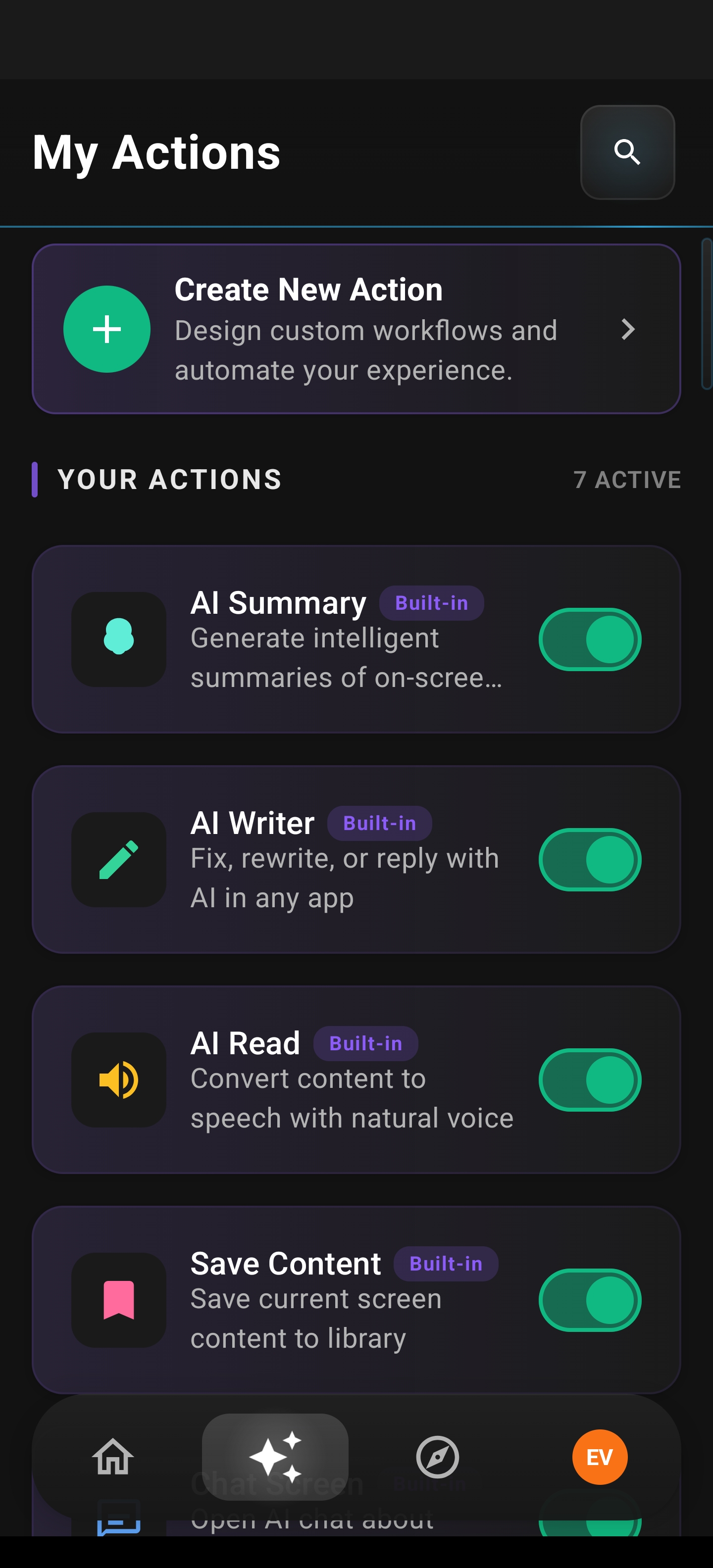
Arc for Android includes a feature called Custom Actions that lets you build a screen-level fact checker in under a minute. Here’s how it works:
Step 1: Open Arc Assist
While viewing any claim on your screen — a WhatsApp message, a tweet, a news article — trigger Arc Assist. It reads what’s on your screen and is ready to act on it.
Step 2: Run your fact-check action
If you’ve set up a custom fact-check action, one tap runs it. The AI extracts the verifiable claims, searches for evidence, and returns a structured verdict with sources.
Step 3: Read the verdict
You get a clear answer: is this claim supported, disputed, or debunked? Each verdict includes links so you can dig deeper if you want.
Setting up a fact-check custom action
- Open Arc and go to Custom Actions
- Create a new action with a prompt like: “Check if the following claim is true. Search for evidence from reputable sources and provide a verdict (Confirmed / Disputed / Debunked / Unverified) with source links.”
- Name it something obvious — “Fact Check” works
- Save it
Now, anytime you see a suspicious claim on your screen, you can verify claims on phone with a single tap through Arc Assist.
Real-World Scenarios: When Fact Checking Saves You
Let’s make this concrete. Here are situations where an AI fact checker Android tool changes your decision:
The family group forward
Your uncle sends: “Drinking hot water with lemon destroys coronavirus — WHO confirmed!”
Without a fact checker: You either believe it (and share it) or spend 5 minutes searching while the group moves on to the next topic.
With a fact checker: Highlight → tap → verdict in seconds. “Debunked. WHO has issued no such statement. Similar claims have been fact-checked by Boom Live and Alt News.” You reply with the verdict. Done.
The investment tip
A Telegram channel claims: “SEBI just approved this stock for a guaranteed 3x return.”
Without a fact checker: Tempting. You might act on it.
With a fact checker: “Unverified. No SEBI announcement matches this. SEBI does not endorse stock returns. Source: SEBI official site.” You avoid a costly mistake.
The news headline
A news app shows: “Government bans all petrol cars from 2027.”
Without a fact checker: You panic-text your family about selling the car.
With a fact checker: “Disputed. The proposal is under discussion, not enacted. Multiple sources confirm it’s a draft recommendation, not a ban. Sources: The Hindu, NDTV.” You stay informed, not alarmed.
Screen Fact Check AI vs. Manual Verification: A Comparison
| Factor | Manual Search | Screen Fact Check AI |
|---|---|---|
| Time to verdict | 3–10 minutes | 3–8 seconds |
| App switching | Yes (copy → browser → search) | No (works on current screen) |
| Source comparison | You do it manually | AI cross-references automatically |
| Verdict clarity | You synthesize it yourself | Structured verdict with sources |
| Friction | High — most people skip it | Low — you actually do it |
| Coverage | Whatever you think to search | Broad, across multiple domains |
The difference isn’t just speed. It’s habit formation. When checking a claim takes 5 seconds, you do it every time. When it takes 5 minutes, you do it never. Arc’s screen-level verification is part of why 8,500+ monthly active users across 50+ countries have integrated it into their daily phone workflow — the friction is low enough that checking becomes reflexive.
Building a Fact-Checking Habit on Android
Tools are only as good as the habits around them. Here’s how to make verification automatic:
1. Set up your screen-level trigger
Configure Arc’s Custom Actions so fact-checking is always one tap away. The less friction, the more you’ll use it.
2. Check before you share
Make it a rule: if a claim triggers an emotional response (anger, fear, excitement), that’s exactly when you verify claims on phone before forwarding. Emotional content is the most likely to be false — and the most likely to spread.
3. Trust the sources, not the verdict
Even a good Android misinformation checker can be wrong. Always look at the sources it cites. If the verdict says “confirmed” but the only source is a single blog post, treat it with caution. If three independent outlets agree, you’re on solid ground.
4. Flag what you can’t verify
Some claims fall into the “unverified” bucket — not true, not false, just unsupported. That’s a valid answer. “We don’t know yet” is more honest than a forced verdict.
5. Normalize it in your circles
When someone sends you a questionable forward, don’t just debunk it silently. Reply with the fact-check result. Over time, your group norms shift from “forward everything” to “check first.”
Common Questions About AI Fact Checking on Android
Is AI fact checking accurate?
It depends on the tool and the claim. For well-documented topics (politics, major news, health advisories), accuracy is high because there are multiple verified sources to cross-reference. For niche or emerging claims, the verdict will usually be “unverified” — which is the honest answer. A good tool admits uncertainty rather than fabricating confidence.
Does it work in regional languages?
Some tools support Hindi, Tamil, and other Indian languages. Arc’s AI assistant can process claims in multiple languages, though accuracy is highest for English claims with strong source coverage. Regional language fact-checking is improving rapidly.
What about privacy?
Screen-level fact checkers read your screen content to function. Check what the tool stores and for how long. Arc processes the claim in the moment and doesn’t store your screen data. Avoid tools that require unnecessary personal information.
Can it check images and videos?
Text-based fact checking is mature. Image and video verification (deepfake detection, reverse image search) is emerging but not yet as reliable. For now, if a suspicious claim comes as an image with text, highlight the text portion for verification.
Why Screen-Level Fact Checking Matters More Than Ever
The information ecosystem on phones is fundamentally different from desktops. On a phone:
- Attention is fragmented — you’re in and out of apps in seconds
- Context is minimal — headlines without articles, quotes without sources
- Sharing is frictionless — one tap and a claim reaches 200 people
- Trust is social — you believe forwards from people you know
A desktop fact-checking workflow (open 5 tabs, read long-form, compare) was designed for a different era. Your phone needs a phone-native approach. That’s exactly what a screen fact check AI provides — verification at the point of consumption, not after you’ve already been influenced.
Download Arc — Your AI Fact Checker for Android
If you’re tired of being the person who shares first and checks later (or never), Arc gives you the tool to change that. With Custom Actions and Arc Assist, you can verify claims on phone the moment you see them — no switching apps, no digging through search results, no guessing.
Get started:
- Download Arc from the Google Play Store
- Set up a “Fact Check” Custom Action (takes under a minute)
- Next time you see a questionable claim, highlight it and check
Your phone is where misinformation reaches you. It should also be where you stop it.
An AI fact checker Android tool isn’t about being right all the time. It’s about having the discipline to check before you trust — and the tool to make that discipline effortless.