Overcoming Blank Page Syndrome: How to Generate Instant Social Content with AI
Tired of staring at a blank screen? Learn how Arc: AI Screen Assistant’s 'Create Post' feature turns your current screen context into high-quality social media content instantly.
We have all been there: the blinking cursor on an empty screen, the looming pressure of a post deadline, and the sheer mental fatigue of trying to articulate a coherent thought for social media. This is the Blank Page Syndrome, and it is the single biggest barrier to consistency in personal branding and content creation today.
For many professionals and creators, the friction of switching between apps—copying a link, opening an AI writer, pasting content, and refining the output—is often enough to kill the idea entirely.
What if you could generate the perfect post without ever leaving the app you are currently in?
Introducing ‘Create Post’: The Context-Aware AI Writer
Arc: AI Screen Assistant changes the paradigm of content creation. Rather than forcing you to adapt to the AI, it brings the AI to your workflow. By leveraging Android Accessibility Services, the “Create Post” feature works system-wide. It does not just sit in an isolated app; it understands what you are looking at in real-time.
Whether you are reading a breaking news article, browsing a product page, or analyzing a complex data set in a spreadsheet, Arc is ready to help you synthesize that information into a shareable post.
The “Create Post” mode is designed to eliminate the initial friction of content generation. By analyzing your screen’s active UI, the AI identifies the core message, key takeaways, and relevant context automatically. This acts as an instant “seed” for your writing, allowing you to bypass the mental block of staring at a blank text field. By leveraging your existing data within “My Info Vault,” the generated content maintains your unique tone and personal brand identity, ensuring that every post feels authentic to you.
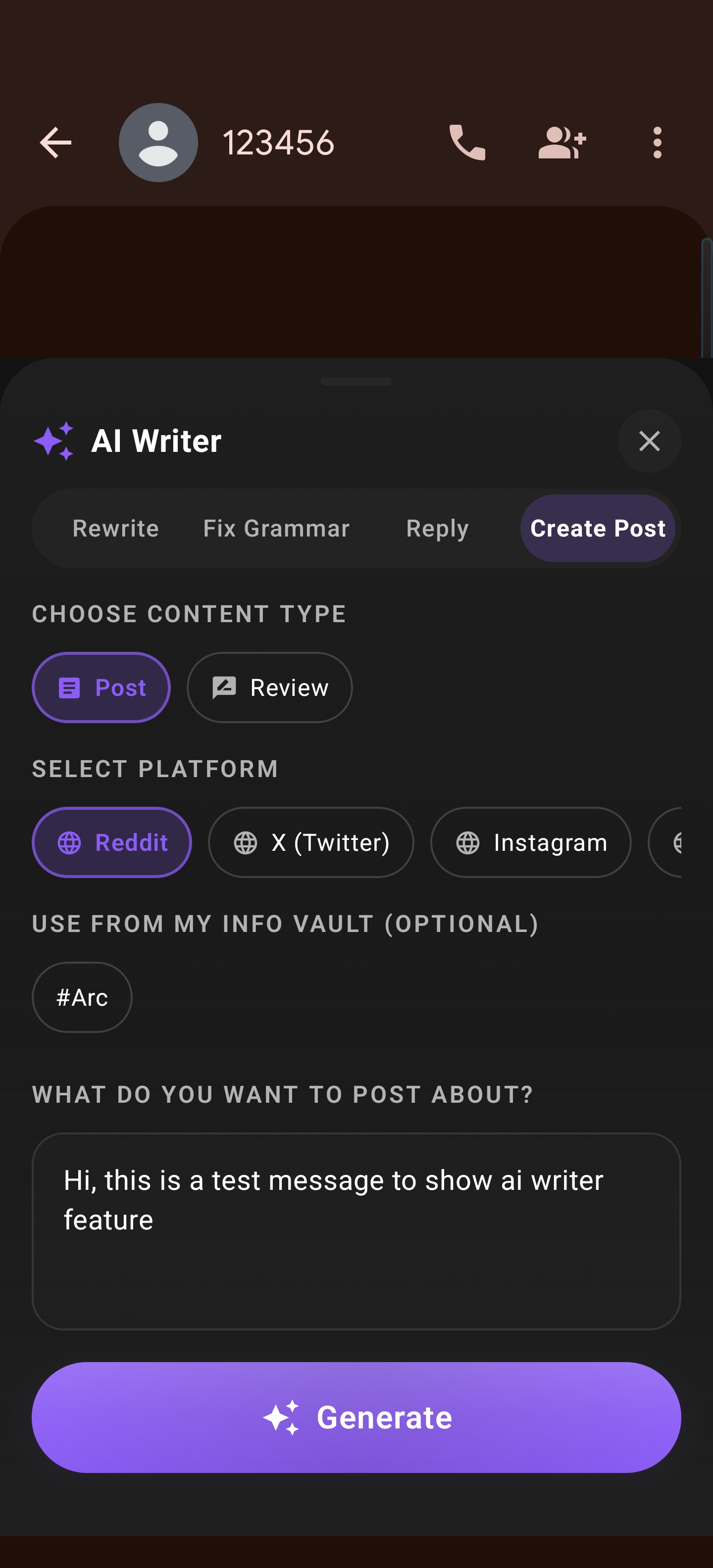
Platform-Specific Tailoring
One of the most common pitfalls of AI-assisted writing is the “one-size-fits-all” output. A post that works on Reddit rarely performs well on X or LinkedIn.
Arc is built with a deep understanding of platform nuances:
- Reddit (Markdown Focus): The AI generates structured, conversational responses that respect Reddit’s culture, utilizing proper Markdown formatting to ensure readability in a text-heavy environment.
- X (Concise Hooks): Arc focuses on brevity and impact, generating punchy hooks that stop the scroll and encourage engagement, adhering to character limits while maintaining clarity.
- Instagram (Visual/Engaging): For visual platforms, the AI creates captions that complement your imagery, focusing on storytelling and clear calls-to-action.
- LinkedIn (Professional): The AI adopts a more polished, insightful tone, perfect for thought leadership and industry analysis.
Iteration via Review Mode
We know that the first draft is rarely the final version. That is why Arc includes a sophisticated Review Mode.
After the initial draft is generated, you have the ability to refine the AI’s output instantly. With a 1-5 star rating system, you can provide immediate feedback to the engine. If the tone is too formal, or the key insight was missed, a simple adjustment allows the AI to iterate on the spot. This creates a tight feedback loop that keeps you in the driver’s seat while letting the AI handle the heavy lifting of composition.
Why You Need an AI Social Media Post Generator
If you are looking for an AI writer for Reddit, an Instagram caption AI for Android, or a tool to simply write better posts with AI, the current landscape is cluttered with disconnected tools. Arc: AI Screen Assistant is the only solution that integrates with your mobile environment, turning your phone from a content-consumption device into a high-octane content-creation engine.
Stop struggling with the blank page. Let the screen you are already looking at become the foundation of your next great post.
Download Arc Today
Ready to transform your content workflow? Stop fighting the blank page and start creating with purpose.