Stop the Copy-Paste Dance: How Arc's Smart Extract Transforms Android Productivity
Discover how Arc's Smart Extract uses AI to automatically parse unstructured text into actionable data, saving you time and reducing context switching. The ultimate guide to the best app to extract dates from text.
We have all been there. You receive a meeting invitation in an email, a restaurant reservation via SMS, or a flight confirmation in a browser tab. To put that information into your calendar or address book, you perform a tedious, high-friction ritual: open the app, find the date, long-press to select, copy, switch apps, open the calendar, paste, switch back, copy the time, switch apps again, paste, and finally save.
This is the “Copy-Paste Dance,” and it is stealing your focus. In a world where we demand instant gratification, this administrative friction is a significant barrier to flow. Today, we are deep-diving into Smart Extract, a powerful feature within Arc that aims to end this cycle permanently by acting as an intelligent bridge between every app on your phone.
The Hidden Cost of Context Switching
Psychologists have long documented the “switching cost” associated with multitasking. Every time you leave your primary task to copy and paste a piece of information, your brain pays a cognitive tax. It takes time to re-orient yourself in the new application, and even longer to return to the original workflow.
When you do this dozens of times a day, the impact on your mental bandwidth is substantial. By eliminating the manual transfer of data, Smart Extract does more than just save seconds—it protects your focus.
What is Smart Extract?
At its core, Smart Extract is an AI-powered intelligence layer that sits on top of your Android experience. By leveraging the Android Accessibility Service, it captures on-screen content in real-time—regardless of whether you are in a web browser, a messaging app, or deep within system settings.
It then feeds this content into the Google Gemini API, which parses the unstructured noise on your screen and converts it into structured JSON objects. It doesn’t just read the text; it understands the intent behind it.
The 8 Categories of Actionable Intelligence
Arc’s Smart Extract is engineered to identify and categorize eight distinct types of data, turning them into one-tap actions:
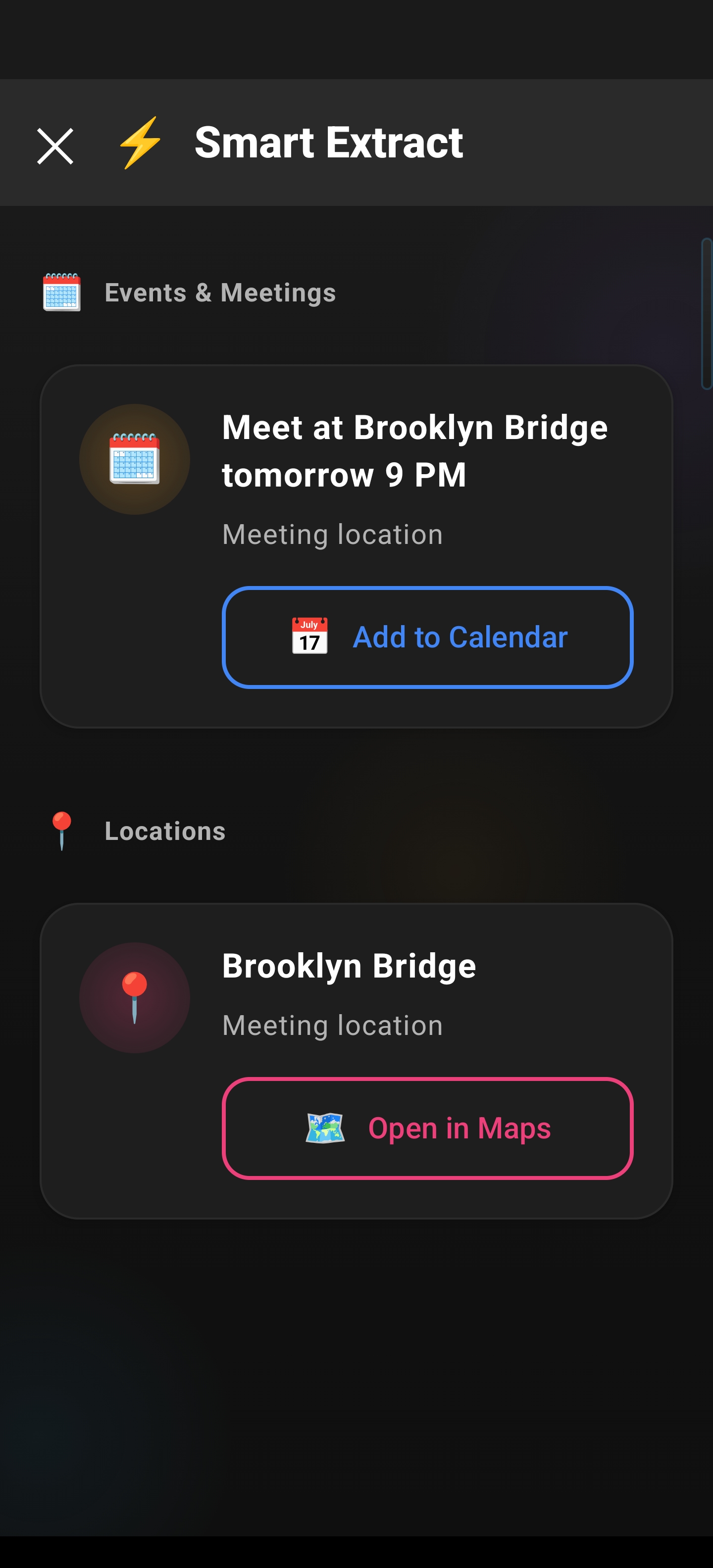
- Events & Meetings: Automatically extract dates, times, titles, and locations to create a new calendar entry.
- Reminders: Identify deadlines and tasks to set instant reminders.
- Contacts: Pull names, phone numbers, and emails to save a contact or initiate a call.
- Meeting Links: Detect Zoom, Google Meet, or Teams URLs to join a meeting instantly.
- Locations: Recognize addresses and places to open them directly in your preferred map application.
- Verification Codes: Effortlessly copy 6-digit OTPs with haptic feedback.
- Phone Numbers: One-tap dialing for any number found on the screen.
- Email Addresses: Automatically compose an email draft to the identified recipient.
The Engineering Behind the Magic
How does Arc achieve this without requiring developers to build custom integrations for every single app? The answer lies in its app-agnostic architecture.
1. Screen Parsing vs. Rigid Integration
Unlike traditional tools that rely on specific API hooks (which only work if the app developer explicitly supports them), Smart Extract parses what is visually present on your screen. This means it works even in apps that have no deep-link support, as long as the information is visible to the human eye.
2. Standard Android Intents
Arc uses standard Android Intents (e.g., ACTION_INSERT, ACTION_VIEW, ACTION_DIAL) to execute actions. Because it relies on these universal system commands, it can seamlessly hand off data to your calendar, maps, or phone app. You aren’t “copying into Arc”—you are using Arc to command your existing apps to perform the right action.
3. Ephemeral Security Architecture
We understand that screen parsing sounds sensitive. That is why Arc is built on an ephemeral processing model. Screen content is captured, sent to the AI, analyzed, and returned as structured data—but it is NEVER stored on Arc’s servers. For sensitive data like Verification Codes, Arc includes an added layer of security: codes are auto-cleared from your clipboard after just two minutes, ensuring your data doesn’t linger where it shouldn’t.
Workflow Comparison: Before vs. After
| Step | Traditional Workflow | Arc Smart Extract Workflow |
|---|---|---|
| Discovery | Toggle apps to find data | Open Sidebar |
| Selection | Long-press, highlight, copy | Tap Smart Extract |
| Transfer | Switch app, open entry | (Automatic) |
| Parsing | Paste, edit fields, correct format | (AI pre-fills all fields) |
| Execution | Save | Tap to Confirm |
The difference is not just speed; it is the total removal of friction. When you use an AI smart extract for Android, you stop being a data entry clerk and start being a director of your own workflows.
Edge Case Handling: When Data Isn’t Perfect
AI is only as good as its contextual understanding, and that is where Smart Extract shines.
- Ambiguous Dates: If an invite says “next Friday,” the AI uses system-time context to resolve the correct calendar date automatically.
- Partial Addresses: If you find a fragmented address in a text, the AI attempts to cross-reference it against map databases to resolve the full location. If it is still insufficient, it suggests a search query rather than guessing wrong.
Why This is the Ultimate “Text to Calendar” App
If you have been searching for an app to automatically create a calendar event from text, you know the pain of inconsistent parsing. Most tools fail because they are rigid. Arc succeeds because it is context-aware. Whether you are dealing with a formal calendar invite or a casual text message, it treats the information as a structural puzzle to be solved, not just text to be copied.
Conclusion
Arc’s Smart Extract is more than a convenience feature—it is a fundamental shift in how we interact with mobile information. By turning static, unstructured text into dynamic, actionable events, it gives you back the most valuable resource you have: your time.
Ready to stop copying, pasting, and switching?
Download Arc from the Play Store and experience the future of intelligent, frictionless Android productivity today.