Stop Forgetting Important Details: Introducing AI Call Insights for Arc
Struggle to remember every detail from important calls? Discover how Arc's AI Call Insights works as the ultimate AI call notes extractor for Android to streamline your productivity.
We have all been there: you hang up the phone after an important client meeting or a complex personal discussion, only to realize minutes later that the exact deadline, number, or action item you discussed has slipped from your memory.
For years, the standard solution was manual note-taking—scrambling to jot down details during the conversation or spending your valuable time scrubbing through a 30-minute recording afterward to find that one specific quote. It’s inefficient, frustrating, and prone to error.
Today, we are changing that. We are excited to introduce AI Call Insights for Arc: AI Screen Assistant, the modern approach to information retention.
What is AI Call Insights?
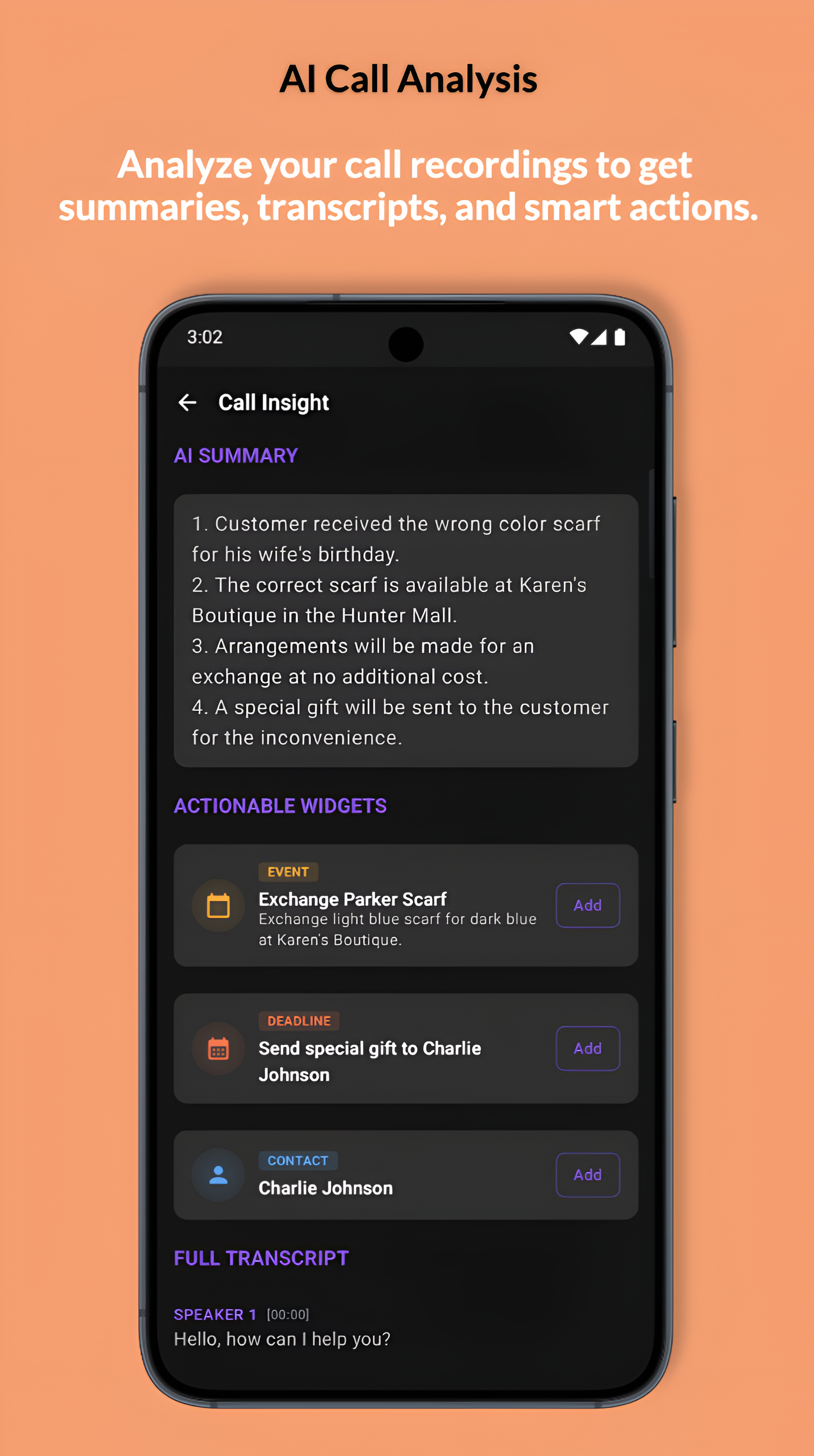
AI Call Insights is designed to be your intelligent partner in professional and personal communication. By leveraging advanced machine learning, it transforms your recorded conversations into actionable intelligence. As a premier AI call notes extractor, Arc processes your audio files to provide:
- Accurate Transcription: Full, searchable transcripts with precise speaker identification.
- Automatic Summarization: Distilled key points, so you don’t have to listen to the entire file to get the gist.
- Action Item Extraction: Arc automatically pulls out specific tasks, dates, and numbers, transforming them into a structured to-do list.
- Seamless Integration: All insights are pushed directly to Arc’s Unread Queue for immediate review.
Important Note: To ensure privacy and compliance, Arc does NOT record phone calls. You must record your calls yourself using your device’s built-in phone recorder or your preferred third-party recording application. Once you have the audio file, Arc can process it into meaningful data.
Two Ways to Gain Clarity
Whether you want to analyze a single high-stakes call or keep a persistent log of your professional interactions, Arc offers two flexible workflows.
1. Manual Upload (One-Time Analysis)
If you only need to analyze a specific conversation, the Manual Upload mode is your go-to. Simply navigate to the Call Insights section in the Arc app, select Manual Upload, and tap “Upload Recording.” This triggers the Android File Picker, allowing you to select your MP3, M4A, or WAV file. Once selected, tap “Analyze Recording,” and Arc will notify you the moment your report is ready.
2. Auto Analysis (Background Monitoring)
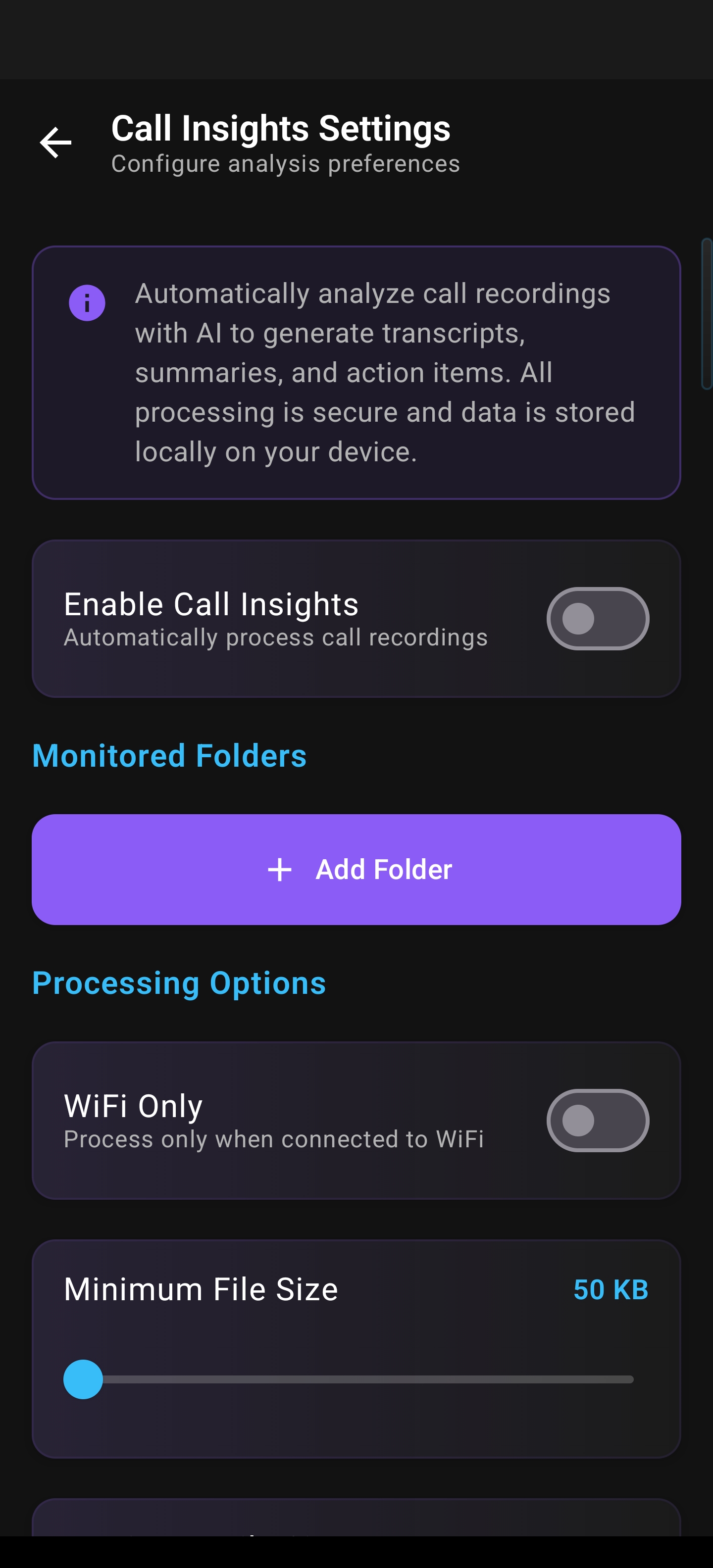
For power users who need a dedicated call transcript generator for Android, our Auto Analysis feature is a game-changer. Toggle this on in your settings to grant Arc access to your recordings folder. You can customize the experience by setting file size limits, defining cutoff dates to ignore older files, and choosing your preferred check frequency (6, 12, or 24 hours). A background worker handles the analysis, alerting you to new insights the moment they are processed.
Why Arc is the Best App to Summarize Phone Calls
Efficiency is the core of the Arc experience. By moving from manual scrubbing to AI-driven summaries, you reclaim hours of your week.
- Task Management: Check off extracted action items directly within the Arc interface.
- Knowledge Retention: Build a searchable, structured history of your important discussions.
- Professional Collaboration: Easily share summaries with colleagues via Android share sheets to keep everyone on the same page.
- Privacy-First Design: We respect your data. Arc utilizes scoped storage permissions, meaning it only accesses the specific folders you explicitly authorize.
Stop relying on your memory or messy notes. Let Arc provide the clarity you need to move forward.
Ready to transform your call habits? Download Arc today and start turning your conversations into actionable steps.